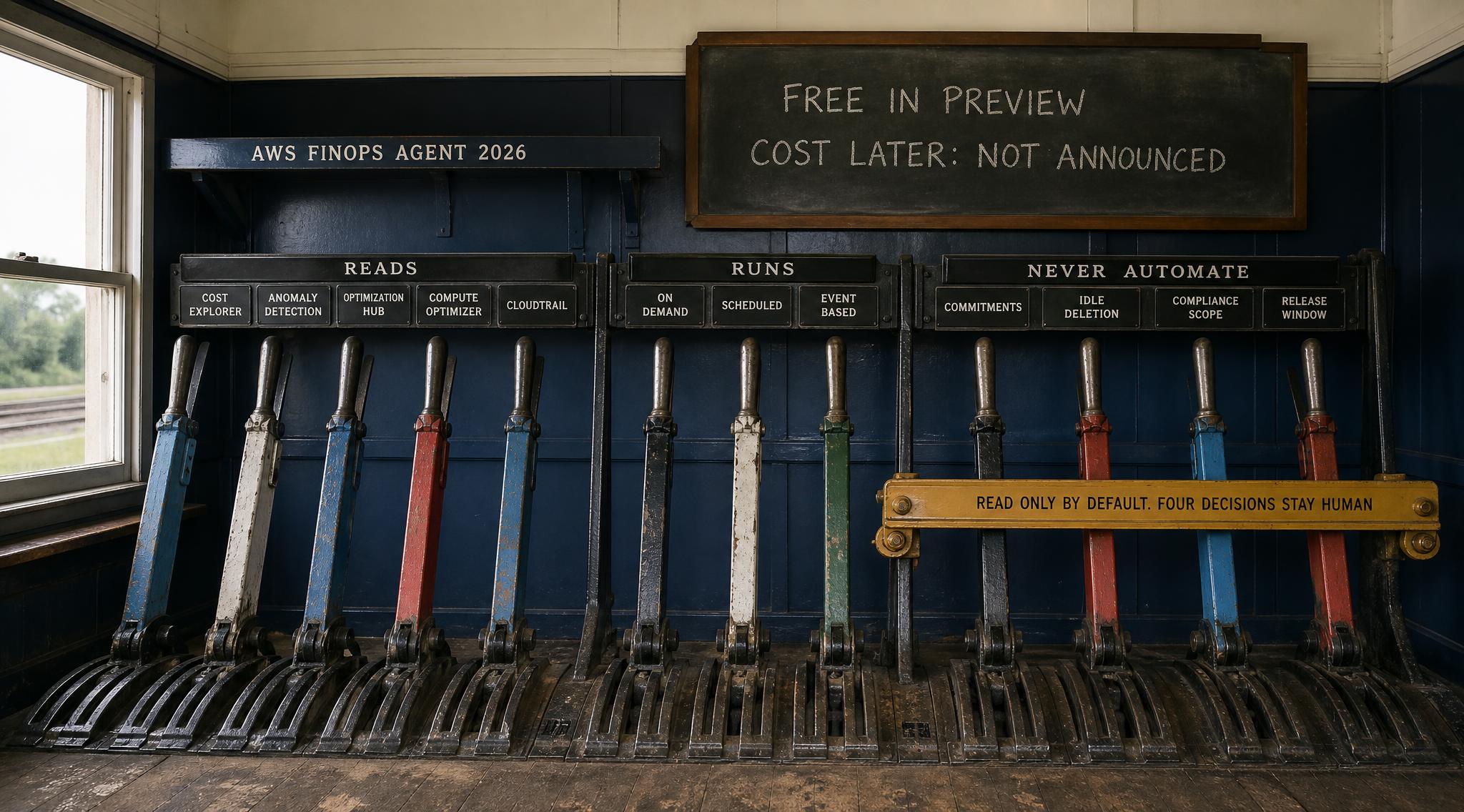
AWS moved its FinOps agent into public preview in June 2026. For a small engineering team the useful question is not whether agentic cost management is arriving. It is narrower: what does an AWS FinOps agent actually do, what does it cost to run, and which decisions should it never be allowed to make on its own.
This post answers those three in that order, using AWS documentation and pricing pages rather than launch coverage. It is written for the team with one to eight engineers, a cloud bill in the hundreds to low tens of thousands a month, and nobody whose job title contains the word finance. That team has the most to gain, because the work an agent automates is exactly the work it currently does not do at all.
Where a sentence is judgement rather than documented fact it is labelled Practitioner opinion inline. Every figure links to the page it came from.
Quick context: what changed in 2026
Two things moved at once. AWS shipped a first party agent for cloud financial management, announced in public preview in June 2026 on the AWS What's New feed and detailed on the AWS Cloud Financial Management blog. Separately the discipline started publishing an opinion on what agents should be trusted with: at FinOps X 2026 the FinOps Foundation ran a keynote titled From Alerts to Agents and presented a Crawl, Walk, Run model for agentic maturity alongside the FOCUS 1.4 billing specification.
The Foundation's framing is the cleanest distinction available: generative AI is reactive and answers what you ask, while agentic AI is proactive and iterative, using tools across your stack to reach an outcome. A tool that answers is safe by construction. A tool that acts needs a boundary drawn around it before it is switched on.
What is an AWS FinOps agent
An AWS FinOps agent is an AI agent that reads your AWS cost and usage data, answers cost questions in plain language, investigates cost anomalies on its own, and runs recurring cost workflows on a schedule you set. It does not replace the AWS cost tools you already have. It sits on top of them and does the manual reading, correlating and reporting a human otherwise does by hand.
The AWS implementation is a managed service, documented at docs.aws.amazon.com/finops-agent. During the preview the agent runs in US East (N. Virginia), and set up in the management account it can see cost data across your accounts and regions. Takeaway: the agent is a reader and a reporter first. Everything beyond that is something you switch on deliberately.
1. The five services it stands on
The agent is not a new source of cost data. It is a new consumer of five existing ones, and knowing which five tells you what it can and cannot see. Per the AWS launch post it reads cost and usage from Cost Explorer, listens for anomaly events from AWS Cost Anomaly Detection, pulls recommendations from AWS Cost Optimization Hub and AWS Compute Optimizer, and uses AWS CloudTrail to identify the change behind a spike.
That has a practical consequence. If Cost Optimization Hub is not enabled, the agent has no recommendations to surface. Cost Optimization Hub consolidates recommendations across accounts and regions, covering rightsizing, idle resource deletion, Savings Plans and Reserved Instances, and its FAQ puts the catalogue at more than 18 recommendation types. Equally, without CloudTrail in the account where the spend happened, root cause analysis degrades to guessing which service grew.
Takeaway: before evaluating the agent, spend twenty minutes confirming all four feeds are on. That is free work worth doing whether or not you adopt an agent.
2. The three shapes of work: on demand, scheduled, event driven
AWS documents three task types: on demand, scheduled and event based. That taxonomy beats a feature list, because each shape carries a different risk profile.
On demand is a question: an engineer asks why the bill moved and gets an answer. No standing permission, no autonomy, so start here. Scheduled is a recurring workflow, and AWS describes recurring cost reports rendered in downloadable HTML, PDF or PPT. For a startup that is the quiet win: a monthly cost review that actually happens without anyone volunteering an afternoon.
Event based changes your operating model. The launch post gives the canonical example: when an anomaly is detected above a threshold you set, investigate it, find the root cause, and post findings to a Slack channel. From then on every anomaly is investigated the moment it arrives, and the output names what changed, the CloudTrail event that caused it, the IAM principal responsible, and a summary of the likely cause.
Takeaway: adopt the shapes in that order. On demand this week, scheduled reporting next month, event driven investigation once you trust the first two.
3. What it costs to run today, and the pricing shape to plan for
Today the direct cost is zero with a ceiling. Per the AWS FinOps Agent FAQs the agent is free during public preview subject to a monthly usage limit, and standard charges still apply for the other AWS services used in connection with it. That second clause is the one teams miss: Cost Explorer calls, CloudTrail data events and anything the agent triggers are billed normally.
For the cost after preview, AWS has not published general availability pricing. What it has published is how its sibling frontier agents are billed, which is the best available evidence for the shape to plan around. AWS DevOps Agent is $0.0083 per agent second, billed per second with no charge for idle time, roughly $30 per hour of active agent work. AWS Security Agent is $50.00 per task hour with per second metering.
Practitioner opinion: budget for metered active time rather than a seat licence, and assume the bill tracks how much investigating you ask for rather than how big your estate is. If you build your own agent instead, the same logic applies a layer down: Amazon Bedrock AgentCore Runtime bills consumption per second with CPU scaling to zero during input and output waits, which matters because agent workloads spend much of their time waiting on model responses and API calls.
Takeaway: use the free preview window to measure how many investigations a month your team actually triggers. That number is what you multiply by whatever rate lands at general availability.
4. An AWS FinOps agent versus a dashboard versus a share of savings platform
Three things get sold into the same budget line and they are not substitutes. A dashboard shows you spend and waits. An agent reads the same data, reaches a conclusion, and can be given the ability to act. A share of savings platform acts on your behalf and prices itself as a cut of what it saves. The decision rule is about where your bottleneck sits, not which is most capable:
- Nobody is looking at the bill. The bottleneck is attention. A scheduled report plus event driven investigation fixes that directly, and the first party option costs nothing during preview.
- Someone looks and cannot explain what they see. The bottleneck is correlation, which is the agent's strongest documented capability: it joins the cost change to the CloudTrail event and the IAM principal behind it.
- You know what to do and nobody has time. The bottleneck is execution. That is where an automation platform earns its price, and the only case where a share of savings model is straightforwardly rational.
- Spend under roughly $1,000 a month. The bottleneck is your own time. Practitioner opinion: an hour reading Cost Optimization Hub yourself beats onboarding a third tool, and the preview gives you the reading free.
Practitioner opinion on commercial shape: in a share of savings contract, read the definition of savings before the percentage. A rate applied to a generous definition costs more than a higher rate applied to a strict one, and the definition is where the negotiation lives. Takeaway: name your bottleneck first, then pick the category.
5. The permission boundary: read only until you widen it
This is where the risk lives and also where AWS chose a good default. Per the FAQs and the IAM documentation, the agent operates in read only mode against AWS Billing and Cost Management products by default. It takes a write action, such as opening a Jira ticket, only when you have configured that integration and it is acting on a task you asked it to run.
Two details matter before setup. The agent uses Amazon EventBridge actions to manage event triggered automations, so without those permissions it cannot create the anomaly investigation automation at all. And every service specific action is enumerated in the Service Authorization Reference, which is what to scope your policy against rather than accepting a broad managed one. The IAM setup guide covers the initial wiring.
Practitioner opinion: keep the agent read only for a full billing cycle even though the integrations are tempting. You are trying to learn whether its conclusions are correct, and you cannot learn that while it is also changing things. Takeaway: the default is safe and the widening should be a deliberate act.
6. Four decisions the agent should never make alone
Commitment purchases. This boundary is hard for a documented reason, not a cautious one. Savings Plans trade lower prices for a specific hourly commitment over a one or three year term, and the AWS FAQ states plainly that you cannot modify or cancel them. A recommendation engine optimises against usage it can see. It cannot see that you are about to migrate a workload, sunset a product, or move a service to Graviton. An irreversible multi year commitment made on a partial view is the one cloud cost mistake you cannot unwind on Monday.
Deleting anything labelled idle. The Hub's optimization strategies include stopping or deleting idle resources to save up to the full resource cost. Idle in a metrics sense and unused in a business sense are different claims: disaster recovery standbys, quarterly batch infrastructure and a warm spare behind a compliance obligation all look idle on a CPU graph.
Changes inside a compliance scope. If a log group, bucket or instance sits inside a PCI DSS, SOC 2 or DPDP boundary, a cost optimisation is also a control change and needs the same review any control change gets.
Production instance family changes during a release window. Rightsizing is correct and the timing is a human call.
Takeaway: write these four into an explicit exclusion list at the moment you grant any write permission, not after the first surprise.
7. A root cause is not a decision
The anomaly investigation output is genuinely strong. It names the cost change, the CloudTrail event behind it, the IAM principal responsible and a summary of the likely cause. That is most of an afternoon's work delivered in minutes, and for a team with no finance function it is the highest value thing in the preview.
What it does not deliver is the judgement that follows. A spike caused by a new embedding pipeline is a root cause. Whether that pipeline is worth its cost is a product decision, and the agent has no access to the revenue, the roadmap or the customer commitment on the other side of it. The FinOps Foundation frames the same gap as business context in its agentic use cases work, and its Crawl, Walk, Run model is essentially a sequence for supplying that context before increasing autonomy. There is published research in the same direction: a 2025 arXiv paper, FinOps Agent: A Use Case for IT Infrastructure and Cost Optimization, studies the pattern and is worth reading alongside vendor material precisely because it is not selling anything.
Takeaway: route findings to a human who knows what the spend was for. Practitioner opinion: the highest leverage setup for a small team is an agent that investigates automatically and decides nothing, posting into a channel where the engineer who shipped the change sees it the same day.
8. The operational edges worth knowing first
Three documented behaviours shape your first fortnight, and all three are easy to plan around.
First, Cost Optimization Hub takes 24 hours to populate on first enablement and refreshes daily after that, per the Hub FAQ. Enable it a day before you evaluate anything.
Second, savings estimates are deduplicated rather than summed. The Hub identifies recommended actions that interact and reduces aggregated savings by the degree of overlap: an EC2 instance can be stopped or rightsized but not both, so it counts the higher of the two. That is correct behaviour, and it means the headline number is already conservative. Read it as a realistic ceiling rather than a floor.
Third, during the preview the agent runs in one region while reading cost data across accounts and regions from the management account. Plan the access path once, in the management account, rather than per workload account.
Takeaway: enable the Hub first, wait a day, then start asking questions. The other order produces a thin first impression of a tool that had nothing to read.
9. Running this on a ten person team in one week
- Day one. Enable Cost Explorer, Cost Anomaly Detection, Cost Optimization Hub and CloudTrail in the management account. Set an anomaly threshold that matches your bill rather than a default.
- Day two. Set the agent up in the management account, read only, and ask it what you would ask a new hire: what did we spend last month, what moved most, what is the largest line item.
- Day three. Write the exclusion list from section 6 into a short document in your repository. Four bullets is enough, and it makes every later permission decision quick.
- Day four. Create one scheduled task: a monthly cost report into the channel your engineering leads actually read.
- Day five. Create one event based automation: investigate anomalies over a threshold and post the findings. Leave every write integration off.
Takeaway: the sequence matters more than the speed. Each step is reversible, and nothing in the week gives the agent power to change your infrastructure.
Summary table
| Question | Documented answer | Source |
|---|
| What is it | An AI agent that answers cost questions, investigates anomalies and runs recurring FinOps workflows | FinOps Agent user guide |
| What it reads | Cost Explorer, Cost Anomaly Detection, Cost Optimization Hub, Compute Optimizer, CloudTrail | AWS CFM blog |
| Cost now | Free in public preview with a monthly usage limit; underlying services billed normally | FinOps Agent FAQs |
| Cost later | Not announced. Sibling agents meter active time at $0.0083 per agent second and $50.00 per task hour | DevOps and Security Agent pricing |
| Default permissions | Read only against Billing and Cost Management; writes need a configured integration | FinOps Agent IAM docs |
| Task types | On demand, scheduled, event based | FinOps Agent task management |
| Preview region | US East (N. Virginia), reading across accounts from the management account | FinOps Agent docs |
| Never automate | Commitments, idle deletion, compliance scoped changes, release window resizing | Savings Plans FAQ, Hub strategies |
Which stage are you
Pre-seed, spend under roughly $1,000 a month. Enable the four underlying services, run the agent read only, and treat the free preview as a monthly reading habit. There is not yet enough waste in the bill to pay for a third party platform.
Seed, roughly $1,000 to $10,000 a month. This is where the scheduled report and event driven investigation pay for themselves in attention alone. Write the exclusion list, keep writes off, and revisit commitments quarterly with a human deciding.
Series A, above roughly $10,000 a month. The commitment question now carries real money and deserves a standing monthly slot with a named owner. Keep the agent as investigator and reporter, and keep the irreversible decisions with the person who knows the roadmap.
Where to start
If you want a structured pass over your own account before wiring any of this up, the free cloud checklist on this site walks the same ground the agent reads: the four services above, the anomaly thresholds, and the commitment questions worth answering yourself. Open it at the checklist. If you would rather have the first pass done for you and written up, MatrixGard sells a fixed scope Cloud Cost Audit at ₹35,000 / $3,000, and the twenty minute audit call is free either way.
Agentic FinOps will keep moving quickly, and the teams that get the most from it will be the ones who drew the permission boundary early and then widened it on purpose. That is cheap to do this month and expensive to retrofit later.
About the author
Avinash S is the founder of MatrixGard, a fractional DevSecOps practice for early stage startups, funded or bootstrapped. He works on cloud cost, infrastructure and security posture for teams without a dedicated platform or security hire.
Methodology note
Every product capability, pricing figure and permission default here comes from AWS documentation, pricing pages or launch announcements, linked inline at the point of the claim. Discipline material comes from the FinOps Foundation; the research reference is a 2025 arXiv preprint. No third party vendor pricing is quoted, because those figures could not be verified against the vendors' own documentation at the time of writing and a secondary blog is not a source for a price. Judgement is labelled Practitioner opinion inline. AWS FinOps Agent was in public preview at the time of writing, and preview behaviour, regions and limits can change, so check the linked pages before acting.