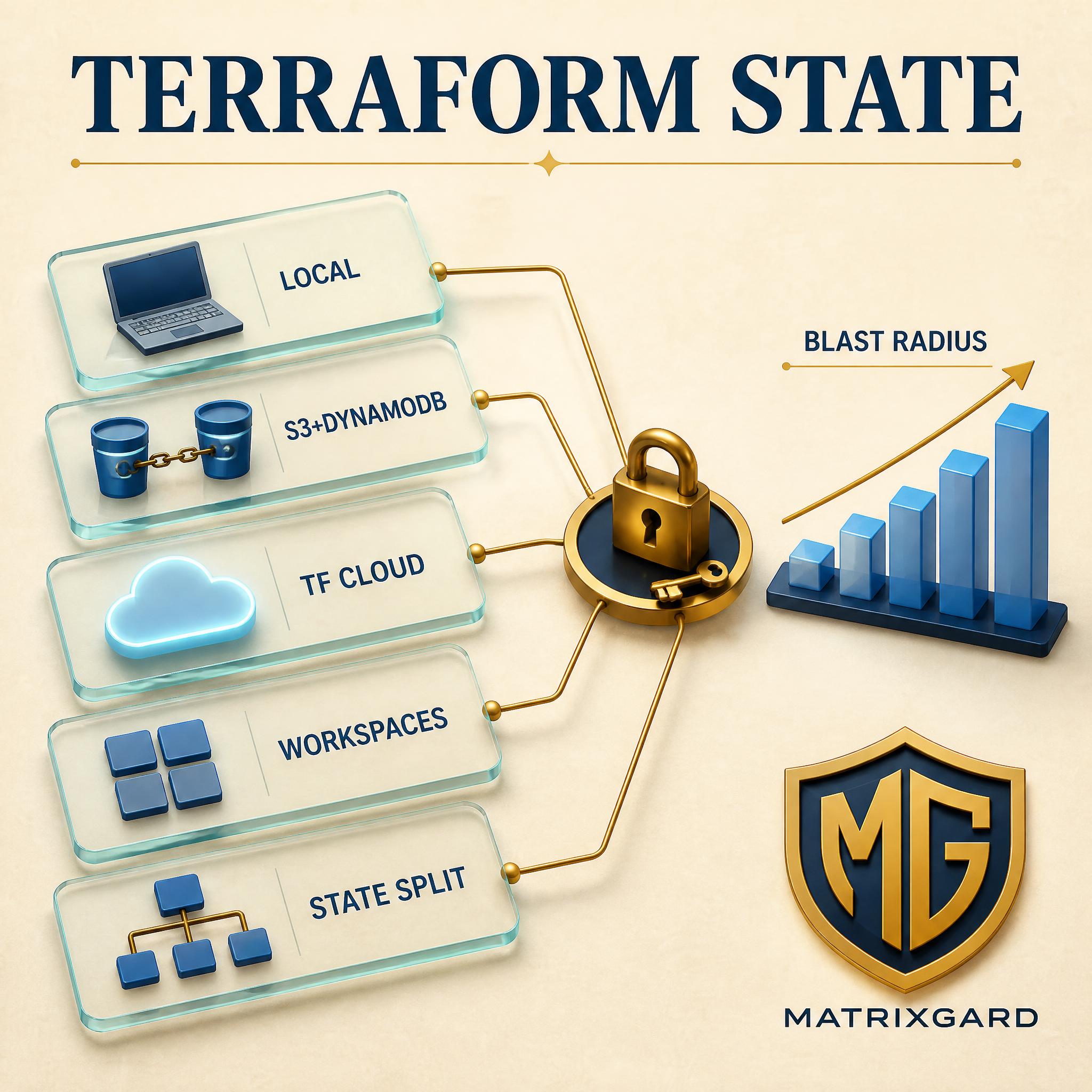
Terraform state is the single piece of your infrastructure setup that, when it goes wrong, costs you a weekend and possibly a production outage. State files are not Terraform code. They are a serialised snapshot of every resource Terraform has provisioned for you, with attributes, dependencies, and (often) sensitive values embedded in plain JSON. Lose the file, and Terraform forgets what exists. Corrupt the file, and Terraform tries to recreate things that already exist. Let two engineers run apply at the same time without locking, and the file becomes a race condition that leaves your account in a half-applied state.
This is the honest 2026 review of the five state-management patterns I see in early-stage startups, funded or bootstrapped, what each one is good at, and the specific scale point at which each one breaks. Recommendations are stage-specific (pre-seed, seed, Series A) and grounded in actual production failures, not the marketing pages of the runner vendors. OpenTofu is now a real fork with its own release cadence and a growing user base; the patterns below apply to both Terraform and OpenTofu unless I call out the difference.
Quick context. A Terraform run does two things to state. First, on terraform init it reads the backend block and figures out where state lives. Second, on terraform plan and apply it reads the existing state, compares it to your desired configuration, and writes a new state back to the backend. The backend is the contract between Terraform and the persistence layer. Local backend means a terraform.tfstate file in your working directory. Remote backends include S3 with DynamoDB, Google Cloud Storage, Azure Blob Storage, Terraform Cloud (now HCP Terraform), and a handful of others. Reference: HashiCorp State documentation.
The choice of backend governs three things that matter at scale: where the file lives, how it is locked during a run, and who can read or write it. The five patterns below differ on those three axes. The breakage points are where the chosen pattern stops scaling on at least one of them.
1. Pattern one: Local state on a laptop
The default backend when you run terraform init with no backend block is the local backend. State is a JSON file named terraform.tfstate in your working directory, with a backup at terraform.tfstate.backup. It is the simplest possible setup, and for a single engineer prototyping in a sandbox account on day one, it is fine.
Where it breaks. The moment a second person needs to run Terraform against the same infrastructure, local state is dead. There is no shared source of truth, no locking, no way to know if the file in your colleague's checkout is current. Engineers compensate by emailing tfstate around, committing it to git (please do not), or running everything through one person. All three are anti-patterns. Committing state to git additionally leaks every secret Terraform put in state into the repo history.
The other quiet failure is laptop loss. If the state file lives only on a MacBook and the MacBook dies, the infrastructure is orphaned. Terraform does not know it exists. You either reconstruct state by writing a long sequence of terraform import commands, one per resource, or you destroy and rebuild. Both options are days of work and real production risk.
Practical takeaway: use local state only for throwaway sandbox experiments. The moment the work matters, move to a remote backend on day one. Reference: Local backend docs.
2. Pattern two: S3 with DynamoDB locking on AWS
This is the workhorse pattern for AWS-based startups and probably the single most common backend I encounter on audits. State lives in an S3 bucket with versioning and server-side encryption enabled. A DynamoDB table with a partition key named LockID provides the lock; Terraform writes a row to the table at the start of a run and deletes it at the end. The backend block is short, the IAM is straightforward, and the costs are negligible at startup scale.
Canonical setup. One S3 bucket per environment or per account, versioning ON, default encryption with a customer-managed KMS key, and a bucket policy that denies any non-TLS access. A single DynamoDB table per account is enough. Reference: HashiCorp S3 backend docs.
One important 2024 change. HashiCorp shipped native S3 locking via the use_lockfile = true option (Terraform 1.10+), which stores a lock file alongside the state file in S3 itself, no DynamoDB table required. For new setups in 2025 and 2026, you can skip DynamoDB entirely. Existing setups with DynamoDB locking continue to work and do not need urgent migration. Reference: S3 native locking.
Where it breaks. Three failure modes. First, a stale lock when a run is killed (laptop sleep, Ctrl-C, runner crash) leaves the DynamoDB row in place and blocks the next run. Fix it with terraform force-unlock LOCK_ID, safely only when you actually know no one else is running. Second, S3 versioning is mandatory; without it a corrupted state means you restore from absolutely nothing. Third, IAM permissions for the bucket and table tend to be over-scoped at startup, so any engineer can overwrite production state. Tighten with object-level S3 conditions and per-environment role separation before you hire the third engineer.
3. Pattern three: GCS or Azure Blob with native locking
The Google Cloud Storage backend uses native object locking via the GCS API; there is no separate DynamoDB-equivalent table to provision. The Azure Blob Storage backend uses lease-based locking on the blob itself. Both are conceptually cleaner than the historical AWS pattern because the lock and the state live in the same primitive.
GCS setup. A single bucket per environment, uniform bucket-level access ON, customer-managed encryption keys, and Object Versioning enabled. The backend block is five lines and Terraform handles locking for you. Reference: GCS backend docs. Azure setup. A storage account with a container, soft delete enabled, and a Service Principal or Managed Identity that has Storage Blob Data Contributor on the container. Reference: azurerm backend docs.
Where it breaks. On GCS, if soft delete is not enabled and an engineer accidentally deletes the state object, you lose everything. Versioning is the safety net; enable it before your second engineer touches the project. On Azure, lease-based locks expire after 60 seconds by default and a long-running apply on a large state file can race itself if the apply takes longer than the lease and the lease cannot be renewed cleanly. Rare, but it has happened to teams running 2000+ resources in a single state.
Practical takeaway. For GCP-first or Azure-first startups, use these native backends; no need to bolt on a third-party tool. Make sure versioning and soft delete are enabled before any non-prototype run.
4. Pattern four: Terraform Cloud (HCP Terraform) or Spacelift
HCP Terraform (the rebrand of Terraform Cloud since 2024) is HashiCorp's hosted runner. It stores state, runs plans and applies on managed workers, surfaces a web UI for plan approvals, and integrates with VCS providers for plan-on-PR workflows. Free for the first 500 resources, then per-resource or per-seat pricing tiers above that. Reference: HCP Terraform docs.
Spacelift is the most-cited independent alternative. Native support for Terraform, OpenTofu, Pulumi, CloudFormation, and Kubernetes manifests. Stack-and-policy model, drift detection, and a richer permissions surface than HCP Terraform at the team scale. Reference: Spacelift docs.
The pattern. State is stored by the runner platform itself (you do not configure an S3 or GCS backend). Engineers commit code, open a PR, the runner posts a plan as a PR comment, a reviewer approves, the apply runs on a managed worker, the state updates. The lock is implicit in the run queue: only one run executes per stack at a time.
Where it breaks. Vendor coupling is the first one. Once you have a year of run history, audit trails, and policy code in the platform, migrating off is a real project. Cost is the second; HCP Terraform's per-resource pricing climbs faster than most teams expect once you cross 1000+ resources. The third failure is OpenTofu drift; HCP Terraform's terms of service restrict OpenTofu use, so if your team has standardised on OpenTofu, Spacelift or Atlantis is the better choice.
5. Pattern five: Atlantis or a CI-driven runner on your own infrastructure
Atlantis is the open-source pull-request automation server for Terraform and OpenTofu. You deploy it as a single container in your own cloud (an ECS task, a small GKE pod, a Fly machine), point your VCS webhooks at it, and it runs plan on every PR and apply on a comment trigger. State lives in whichever backend you configured (S3, GCS, or otherwise); Atlantis is the orchestration layer, not the persistence layer. Reference: Atlantis docs.
The lighter-weight version is GitHub Actions or GitLab CI running plan and apply jobs directly, with state in S3 or GCS. This is what most pre-seed teams converge on after they outgrow laptop state: a single workflow file, OIDC federation to assume a cloud role, S3 backend with native locking, plan-on-PR with a manual approval gate on apply. No external runner platform to pay for.
Where it breaks. Two failure modes. First, the runner becomes a single point of failure once your apply jobs depend on it; an Atlantis pod that crashes during an apply leaves you with stale-lock recovery work plus operational burden figuring out which run was in flight. Second, the security posture of the runner itself matters more than people realise. Whoever can push to the workflow file effectively has cloud admin rights, because they can change what Terraform runs. Lock down the workflow file with CODEOWNERS, require signed commits, and audit-log every apply.
Practical takeaway. This is the most honest fit for a pre-seed or seed startup comfortable operating its own tools. Atlantis or a CI workflow plus S3 plus native locking covers 95 percent of what HCP Terraform sells you, at zero platform cost, with full control. The gap is the polished web UI for non-engineers and the drift-detection feature, which most early teams do not need.
6. The cross-cutting issue: workspaces and environment isolation
Independent of which backend you pick, you have to decide how to split state between environments (dev, staging, prod) and between concerns (network, data, application). Terraform offers two mechanisms: workspaces (one backend, multiple named state files) and full directory or backend separation (one backend per environment, completely independent state).
Workspaces are seductive because they are easy: terraform workspace new prod, run apply, done. They are also dangerous because every workspace lives in the same bucket, under the same IAM, accessible to the same credentials. The blast radius of a misconfigured run is every workspace, not just the one you thought you were targeting. HashiCorp's own workspace docs are explicit that workspaces are not a substitute for environment isolation.
Full separation means a per-environment directory, per-environment backend, per-environment cloud account, and per-environment credentials. The prod state file lives in a prod-only bucket that the dev role cannot read. This is the only configuration where a leaked dev credential cannot destroy prod by accident. Use workspaces only for short-lived, identical environments inside the same trust boundary (ephemeral PR environments are the canonical example).
7. State splitting: one big state file vs many small ones
Past 200 to 300 resources in a single state file, Terraform performance starts to degrade noticeably. Plans take minutes instead of seconds. Refresh storms when a tag changes across hundreds of resources. The probability of a partial-apply failure goes up because the run window is longer. Past 1000 resources in a single state, an apply that fails halfway through can leave you with hours of reconciliation work.
The standard fix is state splitting. Carve the infrastructure into bounded contexts (one state for the VPC and networking, one for the database tier, one for the Kubernetes cluster, one for the application services, one for IAM and identity) and let each have its own state file. Modules that need outputs from another state read them via terraform_remote_state data sources or, better, via SSM Parameter Store or Secret Manager so the coupling is loose.
Where splitting itself breaks. Too many small states becomes a coordination problem. If your application service state depends on five other states and any of those need a coordinated change, you now have a multi-state apply sequence with no transactional guarantee. Split along ownership and change-frequency lines, not arbitrary technical lines. Start with one state file at pre-seed, split at seed when you cross 300+ resources, aim for 5 to 10 states maximum at Series A.
8. The secrets-in-state problem
Terraform state stores every attribute of every resource, including attributes the provider marks as sensitive. Database passwords, RDS master credentials, IAM access keys generated inline, KMS key material wrapped during initial provisioning, all of it ends up as plain JSON in the state file. The state file is encrypted at rest in S3 or GCS, but anyone with read access to the backend has the plaintext secrets the moment they pull state.
HashiCorp official guidance, as of 2026, is to treat the state file as sensitive and restrict access accordingly. Reference: Sensitive Data in State. Practical fixes:
- Generate secrets outside Terraform and inject by reference. Create the database password in AWS Secrets Manager or GCP Secret Manager via a separate workflow, then have Terraform read the secret name and pass it to the RDS instance, never the value.
- Use providers that support secret references. AWS provider's
aws_secretsmanager_secret_version with secret_string sourced from a data block keeps the value out of Terraform state in most attribute shapes.
- Enable state encryption with a customer-managed KMS key. Default S3 encryption with SSE-S3 is not enough; SSE-KMS with a CMK lets you audit every state read.
- Restrict S3 GetObject on the state bucket to the runner role only. Engineers should not pull production state to their laptops.
Practitioner opinion: the most common audit finding I see in this category is a state bucket where every engineer's IAM role has s3:GetObject. Lock that down before anything else.
9. Refactoring state: moved blocks, import blocks, and state mv
Terraform code changes over time. You rename a module, you split a resource group, you adopt a new naming convention. State has to follow the code, or Terraform will plan to destroy and recreate every renamed resource. Three tools matter.
The moved block (Terraform 1.1+) lets you declare a refactor in code. When you rename a resource from aws_instance.web to aws_instance.web_server, you add a moved { from = aws_instance.web; to = aws_instance.web_server } block and Terraform updates state on the next plan, no destroy-recreate. Reference: moved blocks docs.
The import block (Terraform 1.5+) lets you adopt resources that exist in the cloud but not in Terraform state. Write the import block, run plan, Terraform shows you what it would import, run apply. Replaces the older interactive terraform import CLI for production-style workflows. Reference: import block docs.
The terraform state mv CLI is the older mechanism, still useful for one-off surgery. Manual, requires the state lock, leaves no audit trail in your code. Prefer moved blocks in code over state mv on the CLI: code is reviewable, auditable, and survives engineer turnover.
10. The honest summary table
| Pattern | Locking | Cost | Breaks at | Best stage |
|---|
| Local state | None | Free | Second engineer | Sandbox only |
| S3 + DynamoDB or native | DynamoDB or lockfile | Pennies / month | Misscoped IAM, stale locks | Pre-seed and seed AWS |
| GCS or Azure Blob | Native (GCS) or lease (Azure) | Pennies / month | Missing versioning, long applies on Azure | Pre-seed and seed GCP or Azure |
| HCP Terraform or Spacelift | Run queue | $0 to $20+ per resource per month | Vendor lock-in, cost at 1000+ resources, OpenTofu (HCP only) | Seed with budget, Series A |
| Atlantis or CI runner | Backend-level (S3, GCS) | Self-hosted compute | Runner single point of failure, workflow-file security | Pre-seed and seed with ops appetite |
11. Stage-specific recommendations
Pre-seed (1 to 5 engineers, less than 100 cloud resources). S3 plus native locking (or GCS, Azure Blob equivalent) plus GitHub Actions with OIDC. One state file. One backend bucket per cloud account. KMS-encrypted, versioned, IAM tight. Zero platform cost, full control, scales comfortably to 200+ resources. Do not buy HCP Terraform at this stage.
Seed (5 to 15 engineers, 100 to 500 cloud resources). Same backend but split state along environment lines (dev, staging, prod, each in a separate bucket and ideally a separate cloud account). Introduce Atlantis if you want PR-comment workflows without writing them yourself. Evaluate HCP Terraform free tier if you want the polished UI for plan reviews. Tighten IAM so engineers cannot read prod state from their laptops.
Series A (15 to 50 engineers, 500 to 2000 cloud resources). Split state along service-ownership lines as well as environment lines. Introduce a runner platform (HCP Terraform, Spacelift, or Env0) for the audit trail, drift detection, and policy-as-code surface. Plan a deliberate migration if you are still on Terraform 1.5 or earlier; the 1.10+ native S3 locking and import-block ergonomics are worth the version bump. If your team is on OpenTofu, Spacelift or Atlantis are your runner options.
The trap: changing backends late is expensive
Every team that starts with local state and grows out of it pays a one-time migration tax to move to a remote backend. Every team that starts on HCP Terraform and decides to move off pays a similar tax in the other direction. The cost is roughly one engineering week per backend per environment, not counting the institutional knowledge encoded in the runner platform itself (run history, policy configuration, workspace settings). The cheapest path is to pick the right backend on day one and stick with it. For 90 percent of pre-seed startups in 2026, that is S3 (or GCS, Azure Blob) plus native locking plus a CI runner. Upgrade to HCP Terraform or Spacelift when you have a clear reason: non-engineers approving runs, the audit-trail threshold for SOC 2, or a coordination bottleneck the runner platform genuinely solves. Do not upgrade because a marketing page told you to.
If you want a second opinion on your Terraform setup
I run a free 20-minute Terraform state and IaC audit for early-stage startups. Pull your backend config, your workspace structure, your state file count and resource count; bring them. I will give you a ranked list of the three highest-leverage fixes specific to your stage, with rough effort estimates. No NDA needed for the first conversation. Send a note.
Avinash S is the founder of MatrixGard. Fractional DevSecOps for early-stage startups, funded or bootstrapped across India, the GCC, the UK, and the US. Almost a decade of running production workloads across AWS, GCP, and Azure, including Terraform and OpenTofu infrastructure-as-code at 100 to 5000-resource scale.
Methodology note. All technical references taken from public HashiCorp documentation, the Atlantis and Spacelift docs, the OpenTofu project pages, and the AWS, GCP, and Azure provider documentation, current as of May 2026. No vendor sales decks were used. Failure modes are drawn from production audits I have performed across early-stage startups, funded or bootstrapped; specific incidents are described generically. Stage-specific recommendations are practitioner judgment and will vary by team composition and risk appetite.