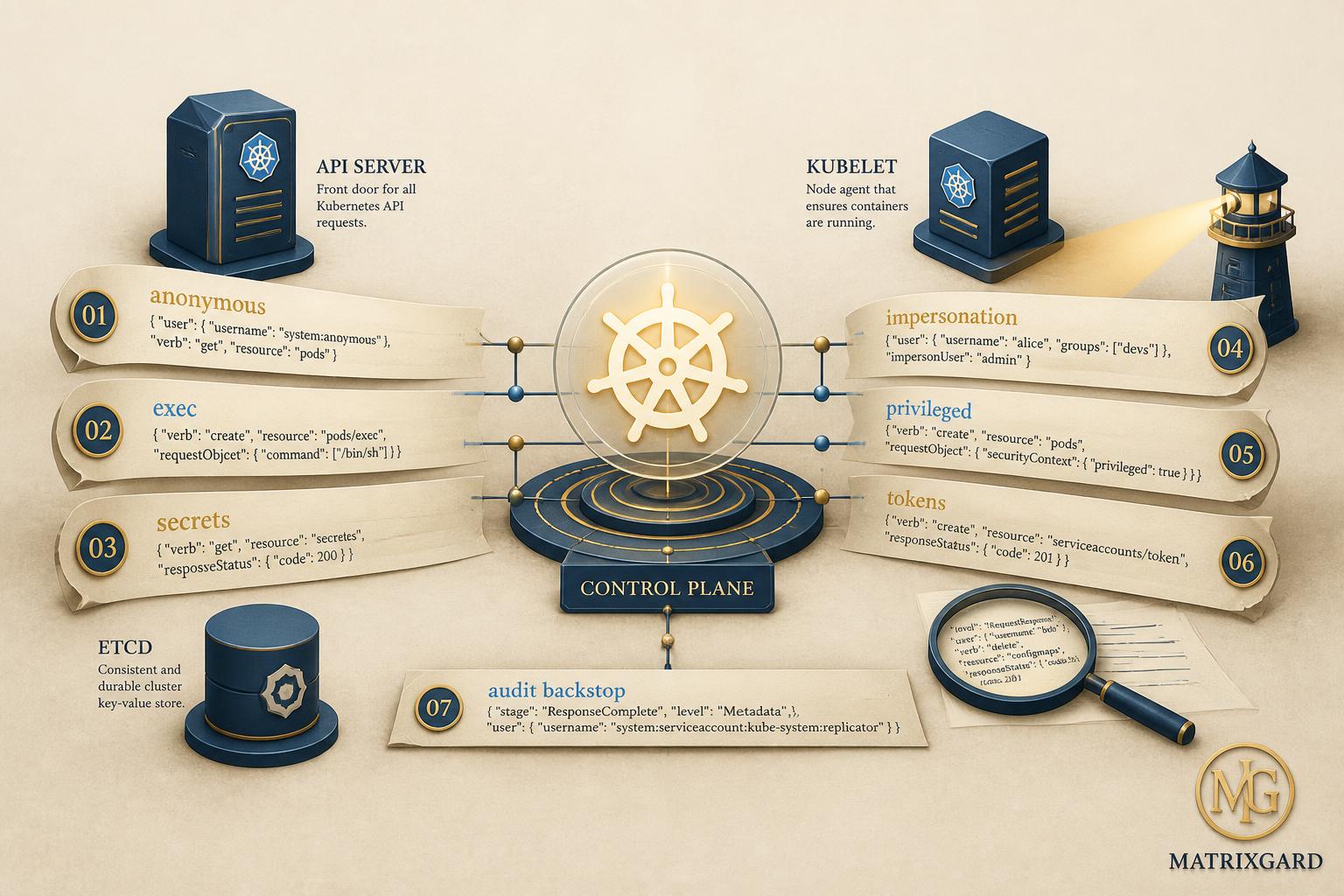
Kubernetes audit logs are the single richest forensic surface most engineering teams already produce and almost no team reads. Every request that hits the API server, from a kubectl on an engineer's laptop to a controller reconciling a Deployment, leaves an immutable JSON line behind. If your cluster gets compromised, the answer to "what did the attacker do, when, from where, with which identity" lives in those lines. The problem is that the volume is overwhelming (a busy cluster emits millions of events per day) and the default tooling does almost nothing to surface what matters.
This post is a practitioner's read on the seven compromise patterns I look for first when an audit log lands on my desk, plus what each one looks like in a real JSON event, and the simplest reliable detection you can wire up for it today. It is written for early-stage startup CTOs and platform engineers running production workloads on EKS, GKE, AKS, or self-managed Kubernetes. The patterns themselves are cluster-agnostic; the wiring differs by provider.
What generic K8s security posts get wrong. Most blog posts on this topic stop at "enable audit logging and use Falco or Tetragon." That is not wrong, but it is also not enough. The runtime tools watch syscalls; the audit log watches the API. An attacker who knows what they are doing can do enormous damage purely through the API (exfiltrate secrets, pivot via service accounts, plant persistence in CRDs) without ever touching a pod's syscalls. The audit log is the only place these patterns show up.
Quick context: how Kubernetes audit logging actually works in 2026
The kube-apiserver supports four audit levels per rule: None, Metadata, Request, RequestResponse. The default in managed clusters varies. EKS Control Plane Logs default to logging API requests at Metadata level when you enable the audit log type. GKE Cloud Audit Logs include admin activity by default at Metadata level; data access logs are off by default. AKS audit-control-plane logs ship to Log Analytics when you enable the diagnostic setting. Reference: Kubernetes Auditing docs.
What you should actually enable. For a pre-seed or seed startup, Metadata level on all verbs (Verbose enough to detect every pattern below) plus Request level on Secrets, ServiceAccounts, and RBAC objects (because you need the request body to spot privilege escalation). Skip RequestResponse globally; the storage cost climbs fast and Metadata covers most patterns. Reference: audit-policy example from upstream.
Storage and query. Ship the events into the provider's native log service (CloudWatch Logs Insights for EKS, Cloud Logging for GKE, Log Analytics for AKS), or into an object store with Athena or BigQuery for ad-hoc query. Real-time alerting needs a stream-processing layer; CloudWatch metric filters and Cloud Logging log-based alerts are the cheap entry point. Falco's k8s-audit plugin ingests the audit stream directly. Reference: Falco k8s-audit plugin docs.
1. Anonymous or system:unauthenticated requests that succeed
The Kubernetes API server, if anonymous auth is enabled (the default in many self-managed clusters and historically in older Kops and Kubeadm setups), treats unauthenticated requests as the user system:anonymous belonging to the group system:unauthenticated. Most requests from this principal should be rejected with a 401 or 403. A successful request, in particular any 2xx response to a read or write from this principal, is a five-alarm signal.
The audit log line looks like this in the user.username field: system:anonymous. The responseStatus.code is the verdict. Filter for any event where user.username equals system:anonymous AND responseStatus.code is between 200 and 299. On a healthy cluster the count should be zero. Anything above zero needs investigation today.
The historical compromise pattern. CVE-2018-1002105 (the "Kubernetes API privilege escalation" bug) and a long line of API server misconfigurations have led to clusters where the kubelet's API or the API server itself accepts unauthenticated requests for specific resources. In 2025 the Tigera and Aqua research teams documented multiple Indian and Southeast Asian self-managed clusters with anonymous read access to pods and secrets; some had write access to events, enabling cryptominer-injection attacks.
Detection. CloudWatch Insights query for EKS:
fields @timestamp, user.username, verb, objectRef.resource, responseStatus.code
| filter user.username = "system:anonymous" and responseStatus.code >= 200 and responseStatus.code < 300
| sort @timestamp desc
| limit 100
Practical takeaway: disable anonymous auth at the API server with --anonymous-auth=false unless you have a documented reason to keep it on. On managed providers, anonymous auth is off by default; verify with a periodic curl test against your API server. Reference: Anonymous requests in kube-apiserver.
2. Pod exec sessions from outside CI or break-glass
The kubectl exec and kubectl attach commands cause the API server to log a request against pods/exec or pods/attach. This is normal during incident response. It is not normal as a steady-state operation. If your audit log shows pod exec requests from a user that is not your break-glass admin or your debugging proxy, you have either an engineer doing debugging from their laptop directly (which is its own RBAC problem) or an attacker who has obtained credentials.
The audit signature. The verb field is create, the objectRef.resource is pods, and the objectRef.subresource is exec or attach. The user.username tells you who; the sourceIPs array tells you from where. A burst of exec requests from a single user against multiple distinct pods in a short window is the textbook lateral-movement pattern after an initial credential leak.
Why this matters at startup scale. Pre-seed and seed teams often share one cluster-admin kubeconfig over the team Slack. Every engineer can exec into every pod. When that kubeconfig leaks (and it leaks), the attacker has root on every workload. The audit log will show exec activity from an unfamiliar IP; that is your only chance to catch them in time.
Detection. Cloud Logging query for GKE:
resource.type="k8s_cluster"
protoPayload.methodName=~"^io.k8s.core.v1.pods.(exec|attach).create$"
protoPayload.authenticationInfo.principalEmail!="break-glass@example.com"
Practical takeaway: bind exec permission to a single break-glass role assumable only with MFA; bind it nowhere else. Alert on every exec call. The signal-to-noise is high. Reference: pods/exec subresource RBAC.
3. Secret access from a service account that does not normally read secrets
Service accounts in Kubernetes get bound to roles that grant them very specific resource access. A logging agent's service account should read pods. A workload's service account might read a single secret it depends on. When that same service account suddenly reads dozens of secrets across multiple namespaces, somebody has either misconfigured RBAC or compromised the pod.
The audit signature. user.username starts with system:serviceaccount:. The verb is get or list. The objectRef.resource is secrets. The detection pattern is volume- and namespace-spread, not absolute count: a service account reading 1 secret per hour is normal; reading 30 secrets across 8 namespaces in 5 minutes is not.
Why this is the highest-value pattern. Most modern Kubernetes attacks pivot through secrets. Compromise a pod, dump its mounted service account token, use it to read secrets in the same namespace, escalate to a cluster-admin secret if one exists, walk laterally. The audit log is the only place this pivot leaves an irrefutable trail. Reference: Service account tokens and audit.
Detection. Falco's k8s-audit rule for unexpected secret access (k8s_audit_rules.yaml, rule Get Secret) is a strong starting point and works out of the box on EKS, GKE, AKS audit streams.
Practical takeaway: use the External Secrets Operator or your cloud provider's secret manager (AWS Secrets Manager, GCP Secret Manager) instead of mounting raw Kubernetes Secret objects whenever possible; the audit trail is then in the cloud secret service, which has finer-grained access reporting. Reference: External Secrets Operator.
4. Impersonation requests, especially toward system:masters
The Kubernetes API server supports impersonation: a privileged user can include Impersonate-User, Impersonate-Group, Impersonate-Uid, and Impersonate-Extra-* headers in a request, and the API server processes the request as if it came from the impersonated principal. Used legitimately, impersonation lets a controller act on behalf of a user (the kubectl auth can-i --as flow uses it).
Used illegitimately, impersonation is a privilege-escalation primitive. A user with the impersonate verb on users and groups can impersonate any principal in the cluster, including the all-powerful system:masters group. That bypasses every RBAC role binding you have configured.
The audit signature. The impersonatedUser field is populated in the audit event. The impersonatedUser.groups array might contain system:masters or another privileged group. Filter for any audit event where impersonatedUser.groups contains system:masters and the request is anything other than a known controller path.
The historical pattern. In 2023 the SecureStack research team published a write-up on cluster takeover via the cert-manager service account when it had an over-broad impersonate permission. The fix was an RBAC tightening; the audit log was the only evidence that anyone had tried. Reference: Impersonation in Kubernetes auth.
Detection. The simplest CloudWatch Insights query for EKS:
fields @timestamp, user.username, impersonatedUser.username, impersonatedUser.groups, verb, objectRef.resource
| filter impersonatedUser.groups like /system:masters/
| sort @timestamp desc
Practical takeaway: grant the impersonate verb sparingly and only on specific user names or groups using RBAC resourceNames, never with wildcard *. Treat any audit event impersonating system:masters as a compromise until proven otherwise.
5. ClusterRoleBinding creation or modification to a privileged role
Privilege escalation in Kubernetes most often takes the shape of a new ClusterRoleBinding that binds the attacker's principal to a powerful role like cluster-admin. This is exactly what every public Kubernetes attack write-up has shown since the original TeamTNT cryptomining campaigns: the attacker creates a binding, executes its work, optionally cleans up by deleting the binding, and moves on.
The audit signature. The verb is create, update, patch, or delete. The objectRef.apiGroup is rbac.authorization.k8s.io. The objectRef.resource is clusterrolebindings or rolebindings. The request body (only present when audit level is Request or RequestResponse) shows the binding target.
Why you need Request-level audit for this rule. Metadata-level audit tells you that a ClusterRoleBinding was created, but not who it bound to which role. You need the request body to extract the roleRef.name and the subjects array. This is the reason I recommend Request-level audit specifically for RBAC objects, even though the rest of the cluster can stay on Metadata level. Reference: RBAC audit guidance.
Detection. Cloud Logging query for GKE:
resource.type="k8s_cluster"
protoPayload.methodName=~"clusterrolebindings.(create|patch|update)"
protoPayload.request.roleRef.name=~"cluster-admin|admin|edit"
Practical takeaway: enable GitOps for RBAC. Every ClusterRoleBinding should come from a reviewed pull request in your IaC repo. An audit event creating a binding that does not exist in your Git history is, by definition, an out-of-band change and worth alerting on.
6. Privileged pod creation or hostPath, hostNetwork, hostPID workloads
A privileged pod (containers with securityContext.privileged: true, hostNetwork: true, hostPID: true, or mounted hostPath volumes pointing at sensitive host paths like /, /etc, /var/run/docker.sock) is a container escape primitive. The pod can read or modify the host filesystem, see all host processes, and in the worst case execute arbitrary host commands.
Most attackers, after they gain RBAC permission to create pods, immediately create a privileged pod that mounts the host filesystem and gives them shell access to the underlying node. This is the canonical Kubernetes-to-host pivot.
The audit signature. The verb is create. The objectRef.resource is pods. The request body (Request-level audit needed here too) contains the pod spec. The detection pattern is any of: containers[].securityContext.privileged: true, containers[].securityContext.capabilities.add containing SYS_ADMIN, hostNetwork: true, hostPID: true, or volumes[].hostPath.path matching a sensitive prefix.
Why Pod Security Admission helps but is not enough. Kubernetes 1.25+ ships Pod Security Admission (PSA) with three profiles: privileged, baseline, restricted. Labeling namespaces with pod-security.kubernetes.io/enforce: restricted blocks privileged pod creation at admission. This is the right preventive control. The audit log is the detective control on top: PSA blocks the attempt, but the audit event tells you somebody tried. Reference: Pod Security Standards.
Detection. Falco's k8s-audit rules Create Privileged Pod and Create HostNetwork Pod cover this out of the box.
Practical takeaway: enforce the restricted PSA profile on all namespaces by default, with baseline only on the system namespaces that need it. Alert on every attempt to create a pod in the privileged profile.
7. Token request burst from a single service account
In 2022 Kubernetes shipped the TokenRequest API and the bound-service-account-token-volume feature, replacing the older long-lived service-account secret model. Pods now receive time-bound, audience-scoped tokens that get rotated automatically. The TokenRequest API itself shows up in audit logs as a request against serviceaccounts/token.
The benign pattern. Every pod requests one or two tokens per hour for token refresh. A logging or monitoring agent might request a token per scrape interval. The volume per service account is predictable and stable.
The compromise pattern. An attacker who has obtained a pod's service account token tries to mint additional tokens (sometimes with extended expiry, sometimes targeting different audiences) to maintain persistence. A sudden burst of TokenRequest events from a single service account, especially with expirationSeconds near the maximum or with audiences different from the normal audience for that account, is a strong persistence signal.
The audit signature. The verb is create. The objectRef.resource is serviceaccounts. The objectRef.subresource is token. The requestObject.spec.audiences array and requestObject.spec.expirationSeconds are visible in Request-level audit events. Detection is volume- and parameter-deviation based: any service account that triples its 24-hour TokenRequest baseline is worth investigating.
Detection. CloudWatch Insights query for EKS (counts TokenRequests per service account in a 1-hour window):
fields @timestamp, user.username, objectRef.namespace, objectRef.name
| filter objectRef.resource = "serviceaccounts" and objectRef.subresource = "token"
| stats count() as tokens by user.username, bin(1h)
| sort tokens desc
Practical takeaway: cap TokenRequest expirationSeconds at the cluster level with the --service-account-max-token-expiration apiserver flag (default is 1 year, which is far too generous for most workloads; cap at 24 hours). Reference: TokenRequest API.
Summary table: the 7 patterns, the audit fields, the detective control
| Pattern | Audit fields to filter on | Required audit level | Primary detective control |
|---|
| 1. Anonymous success | user.username = system:anonymous, responseStatus.code 200-299 | Metadata | Log-based alert in cloud log service |
| 2. Pod exec from non-break-glass | verb = create, objectRef.subresource in (exec, attach) | Metadata | RBAC binding for exec to single role, alert on every event |
| 3. Unexpected secret access | user.username starts with system:serviceaccount:, objectRef.resource = secrets, verb in (get, list) | Metadata | Falco k8s-audit rule, baseline volume thresholds |
| 4. Impersonation to system:masters | impersonatedUser.groups contains system:masters | Metadata | Restrict impersonate verb with resourceNames |
| 5. CRB to privileged role | verb in (create, patch, update), objectRef.resource = clusterrolebindings, request.roleRef.name in (cluster-admin, admin, edit) | Request | GitOps for RBAC, alert on out-of-band changes |
| 6. Privileged pod creation | verb = create, objectRef.resource = pods, request body shows privileged or hostPath | Request | Pod Security Admission restricted profile |
| 7. TokenRequest burst | verb = create, objectRef.resource = serviceaccounts, objectRef.subresource = token | Request | Cap service-account-max-token-expiration, baseline per SA |
Stage-specific recommendations
Pre-seed (1 to 5 engineers, 1 cluster). Enable Metadata-level audit on every verb, Request-level for secrets, serviceaccounts, and rbac. Ship logs to your cloud provider's native log service (CloudWatch, Cloud Logging, Log Analytics) with a 30-day retention. Set up log-based alerts for patterns 1, 2, 4, and 5. Patterns 3, 6, 7 need a runtime tool, defer those for now. Total monthly cost: under USD 30 for a small cluster.
Seed (5 to 15 engineers, 2 to 4 clusters). Add Falco with the k8s-audit plugin on every cluster (free, open source, 100MB pod). Ship Falco alerts into your incident channel. Enable Pod Security Admission with the restricted profile on all application namespaces; baseline only on kube-system and ingress namespaces. Switch raw Kubernetes Secrets to External Secrets Operator pointing at AWS Secrets Manager or GCP Secret Manager. Cap TokenRequest expiry at 24 hours.
Series A (15 to 50 engineers, 4 plus clusters). Adopt a managed Kubernetes runtime security platform (Sysdig Secure, Wiz Runtime Sensor, Datadog Cloud Workload Security, or the open-source Tetragon plus your own pipeline). Centralize audit logs into a SIEM (Datadog, Sumo Logic, Elastic, Chronicle) with cross-cluster correlation. Enforce GitOps for every RBAC object via Flux or Argo CD with policy-as-code gates (Kyverno or OPA Gatekeeper). The audit log is no longer your sole detective control; it is one of three (audit + runtime + IaC drift).
The hidden audit-log antipattern: sampling
Some cluster operators, faced with audit-log storage cost climbing, reach for sampling: log 10 percent of events. Do not do this. Sampling defeats the entire forensic value of the audit log because the one event that matters (the impersonation attempt, the CRB create, the privileged pod) is precisely the rare event that sampling drops. The correct cost optimization is the audit policy, not the sample rate. Drop verbs and resources you do not care about (events, leases, endpointslices, in the default audit policies these often dominate volume) and keep 100 percent of the verbs you do care about. Reference: audit-policy syntax.
If you want a second opinion on your Kubernetes audit setup
I run a free 20-minute Kubernetes audit-log and RBAC review for early-stage startups. Bring your audit-policy YAML, your RBAC binding list, and your top 5 service accounts by token volume. I will tell you which of the seven patterns above are already covered, which are blind spots, and the three highest-leverage fixes specific to your cluster size and provider. No NDA needed for the first conversation. Send a note.
Avinash S is the founder of MatrixGard. Fractional DevSecOps for early-stage startups, funded or bootstrapped across India, the GCC, the UK, and the US. Nearly a decade of running production Kubernetes workloads on EKS, GKE, AKS, and self-managed clusters from 10 to 500 nodes, including audit-log analysis during three real incident-response engagements.
Methodology note. All technical references taken from the public Kubernetes documentation, the Falco security project pages, the AWS EKS, GCP GKE, and Azure AKS provider documentation, and publicly published security research write-ups, current as of May 2026. Failure modes and detection queries are drawn from production audit-log reviews I have performed; specific incidents are described generically. Stage-specific recommendations are practitioner judgment and will vary by team composition and risk appetite.